
1 引言
之前谈过agent的组成,base model、编排层和tools。为了更好的构建agent,如何调用tool,将是必不可少的知识点。
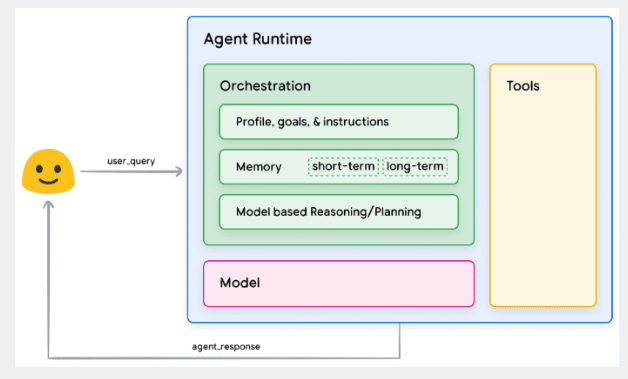
最近翻阅各大模型的tools use的文档的时候,发现这块的文档的例子都比较简单。这次通过调用本地的drissionpage来实现一个deepseek一样的联网搜索。
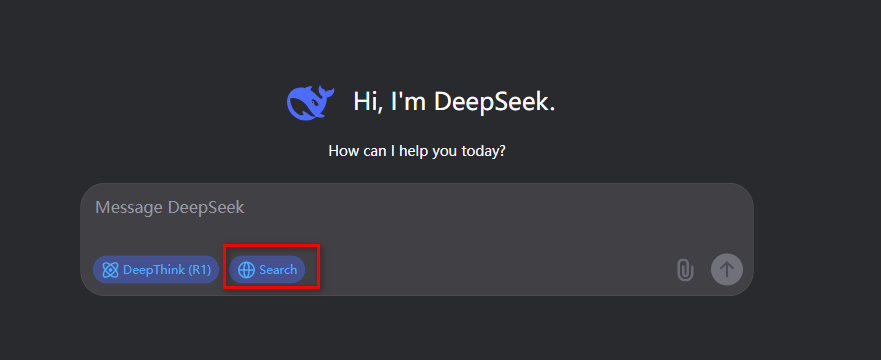
2 效果展示
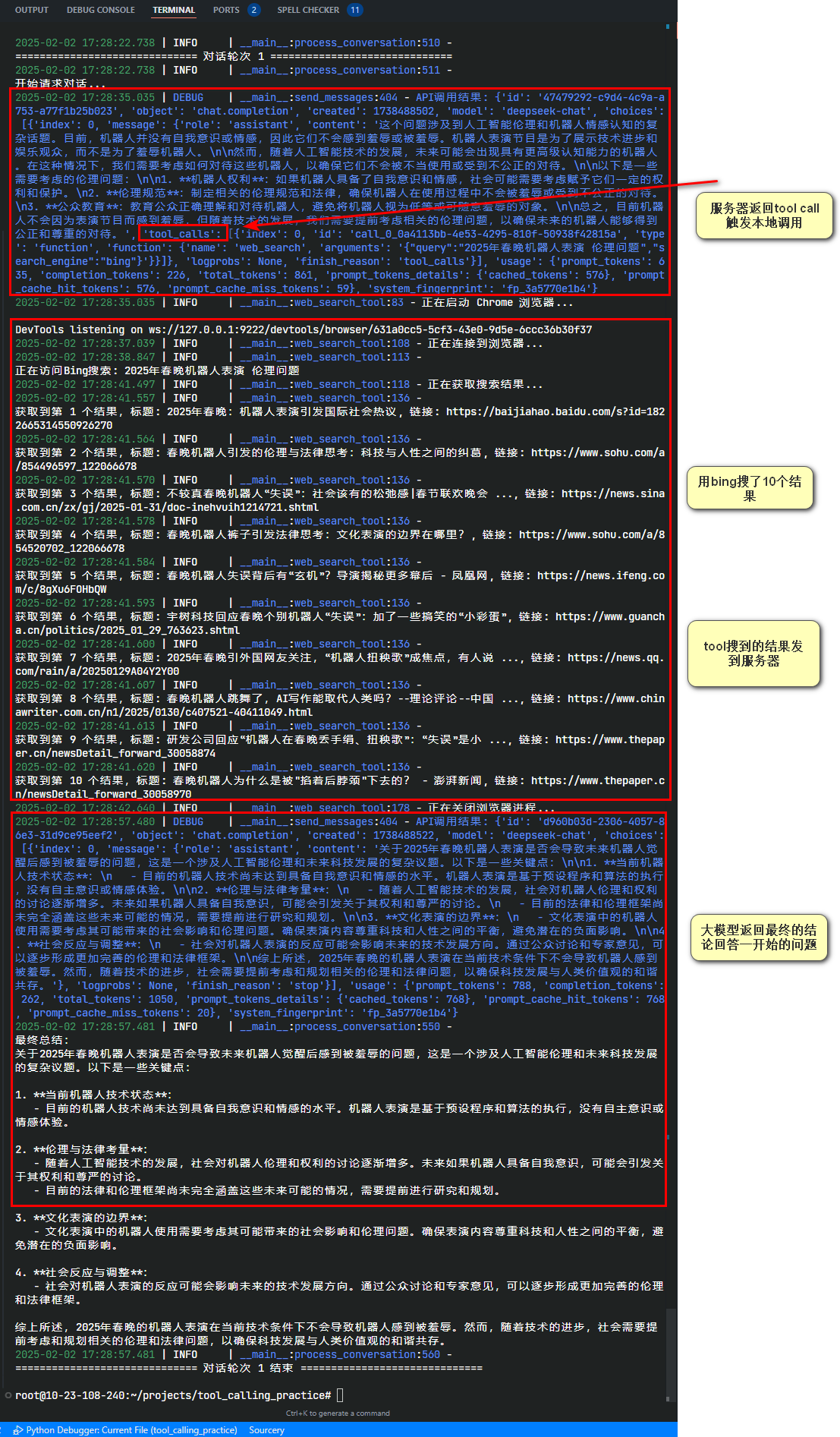
我们用一个最近的例子,让大模型获得访问外部信息的能力。以2025年春晚机器人表演,会导致以后机器人觉醒后认为自己被羞辱么?为问题。
这是第一次,system输入后,大模型知道了自己的执行逻辑。 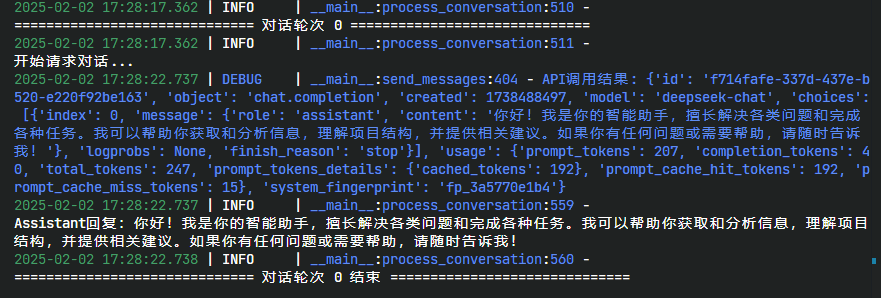 image.png
于是当user prompt输入后,它开始发现需要调用工具,于是调用了我本地的方法进行搜索,然后进行了总结。
3 tool use 概念及基础
3.1 概念
Tool use(工具使用)是一种让大语言模型能够通过调用外部工具/函数来增强其能力的技术。它建立了一个通用协议,规定了大语言模型如何与其他软件系统进行交互。
尽管不同平台使用不同的术语(OpenAI称为function calling,Anthropic称为tool use,DeepSeek和Qwen也各有叫法),但本质上都是指:让语言模型能够调用外部工具/函数来扩展其能力的机制。为行文清晰,本文统一使用"tool use"来指代这一概念,特定平台相关内容除外。
3.2 tool use 的分类
You can extend the capabilities of OpenAI models by giving them access to
tools, which can have one of two forms:Function Calling:Developer-defined code.| Hosted Tools:OpenAI-built tools. (e.g. file search, code interpreter)
一般来说可以分为两种,一种是的服务器端已经具备相关方法/工具。另一种情况是,我们自己本地准备方法工具。从OEPN-AI的流程图上,tools(第三步)也是在客户端侧。因为服务器测的方法其实也是一样的原理的所以我们重点说一下:
当我自己有一个tool,我要如何让大模型调用它,以便于他可以访问外界的知识
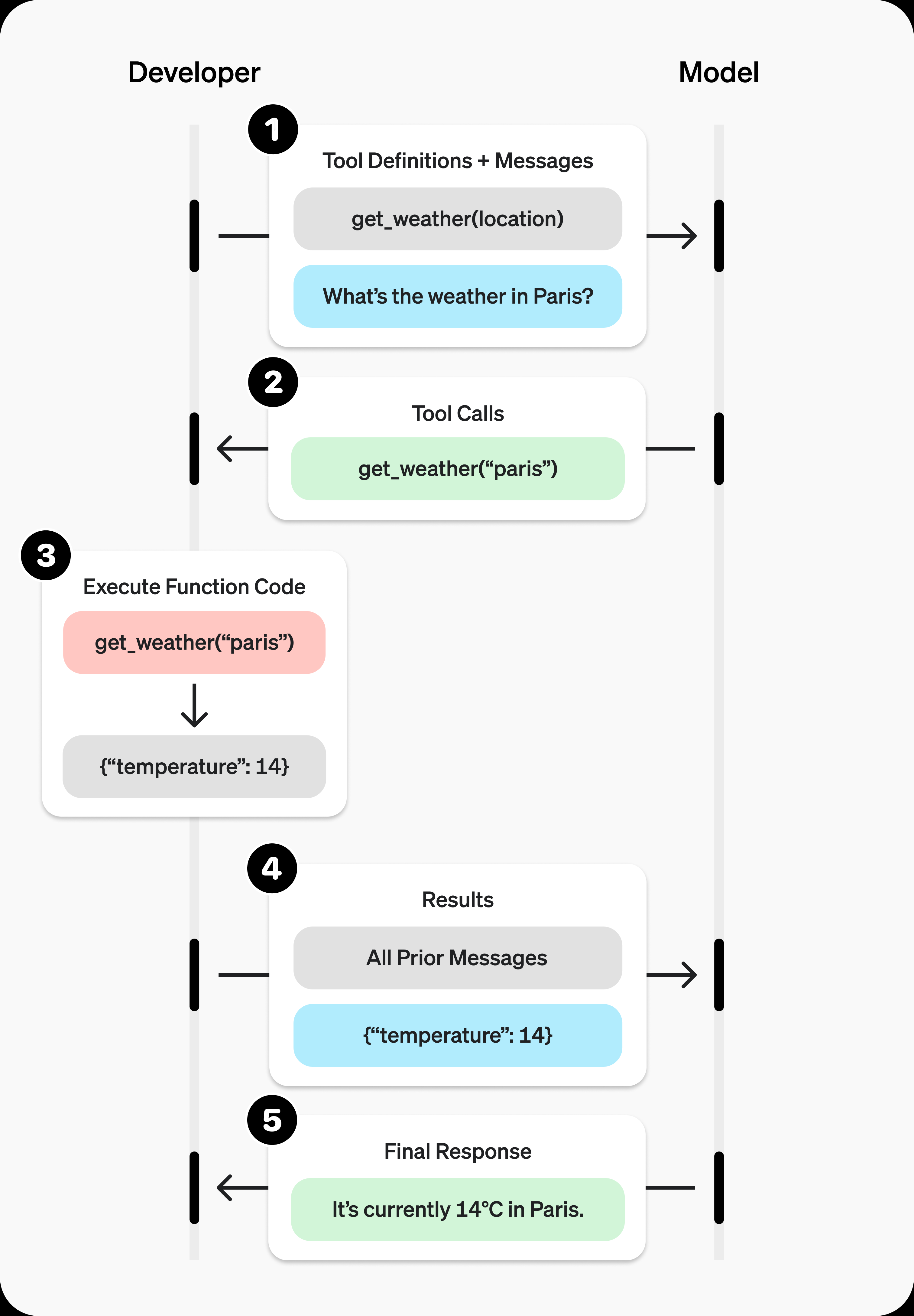
3.3 调用的流程说明
整个流程还是比较简单的:
1. 客户端发起带着tools参数的请求
2. 服务器返回一个函数名称和参数
3. 客户端用函数名称参数调用本地已经准备好的方法
4. 把方法结果加入到messages(整个对话历史),再发送给服务器
5. 服务器把结果一并输出openai、deepseek、qwen的例子都是都是查询天气,其实我觉得不够让人发散。所以从deepseek那个联网搜索的功能角度,来最小化实现一次。
4 实现细节
根据流程,我打算分块实现以下几个部分:
HINT
注意,这里只是演示怎么实现,并不代表最佳的编程方式,实际工程上的,用注册工具的思路会更加清晰
web_search_tool: 这是我们的联网搜索方法,用DrissionPage直接自动化实现搜索。tool use schema: tool use的参数schema定义,用于api传参,toolsend_message: 简单封装了一下用requests请求api,实际上对于支持OPEN AI格式的大模型,可以用openai的库,看个人偏好。handle_tool_call: 对于任何的本地的tool(如果我定义了多个)被调用后,可以在该方法内做对应的结果解析。process_conversation: 对话流程的实现。对于每次的请求,我们需要手动将message(不论是用户的request还是服务器返回的response)都添加到messages(或者叫history)里。
4.1 关键结构
4.1.1 message的结构
message就是我们构造给api发送的request或者大模型回复的response。
message可以分成几种类型:
- system(open-ai的o1会用developer来代替)、user
- assisstant
- tools
4.1.1.1 system或者user message
最常规的messsage类型,一般我们给api传的时候,system贯穿整个对话,一般只在对话开头出现一次,设定了对话的初始条件和行为模式,user则是每次用户的具体输入。两者在结构上并无区别。
{
	"role": "system",
	"content": "you are a helpful assistant",
	"name": "a default messager" // optional
}4.1.1.2 assistant
assistant是大模型给我们的回复。除了role和content,多了几个东西。
reasoning_content:现在的reasoning模型的思考内容。如果不是reasoning模型,那就没有,目前我们先不关注。tool_calls:如果没有工具调用那该选项也是空的,但是如果有,这一json对象的则描述了我具体调用的方法和参数。(很重要,我们后续就是要用它)
tool部分的结构
# tool use schema
class FunctionCallingSchema(BaseModel):
    name: str
    arguments: str

# 工具调用模型
class ToolCall(BaseModel):
    id: str
    type: str = "function"
    function: Dict[str, Union[str, Dict]]

# example
{
  "id": "call_weather_123",
  "type": "function",
  "function": {
	"name": "get_weather",
	"arguments": "{\"location\": \"Shanghai, China\", \"units\": \"celsius\", \"date\": \"2024-02-02\"}"
}一个包含多次tool_calls的例子
{
  "role": "assistant",
  "content": "根据查询结果,明天上海将是晴天,气温23-28度。我已经帮您在日程表中添加了下午2点的户外会议。",
  "reasoning_content": "1. 首先查询上海明天的天气情况\n2. 确认天气适合户外活动\n3. 在日程表中添加会议安排",
  "tool_calls": [
    {
      "id": "call_weather_123",
      "type": "function",
      "function": {
        "name": "get_weather",
        "arguments": "{\"location\": \"Shanghai, China\", \"units\": \"celsius\", \"date\": \"2024-02-02\"}"
      }
    },
    {
      "id": "call_calendar_456",
      "type": "function",
      "function": {
        "name": "add_calendar_event",
        "arguments": "{\"title\": \"户外项目会议\", \"start_time\": \"2024-02-02T14:00:00\", \"end_time\": \"2024-02-02T15:30:00\", \"location\": \"公司花园\", \"description\": \"项目进度讨论\"}"
      }
    }
  ]
}4.1.2 non-stream的response结构
当我们用api,给deepseek等LLM发一个请求,那么他返回结构,主流来说,大概是这样的,包括了请求类型、请求模型、token消耗等。这里最重要的是choices字段,有我们们对话的实际内容,以及到底要不要调用tool:
{
  "id": "3aed3ead-98fc-4da5-9acb-d81c1428c957",
  "object": "chat.completion",
  "created": 1738408513,
  "model": "deepseek-chat",
  "choices": [
    {
      "index": 0,
      "message": {
        "role": "assistant",
        "content": "Hello! How can I assist you today? 😊"
      },
      "logprobs": null,
      "finish_reason": "stop"
    }
  ],
  "usage": {
    "prompt_tokens": 9,
    "completion_tokens": 11,
    "total_tokens": 20,
    "prompt_tokens_details": {
      "cached_tokens": 0
    },
    "prompt_cache_hit_tokens": 0,
    "prompt_cache_miss_tokens": 9
  },
  "system_fingerprint": "fp_3a5770e1b4"
}4.2 关键代码
4.2.1.1 web_search_tool
第一步,必然有一个自己定义的function。这里使用了DrissionPage更直观一点(如果你用requests也行)。因为我是在云服务器上,也没装GUI,所以这里用了无头模式。如果你是windows,可以不开无头直接试试。
def web_search_tool(query: str, search_engine: str = "bing") -> Dict:
    """
    使用DrissionPage进行网络搜索

    :param query: 搜索关键词
    :param search_engine: 搜索引擎,默认使用bing
    :return: 搜索结果
    """
    browser_process = None
    try:
        logger.info("正在启动 Chrome 浏览器...")
        browser_process = subprocess.Popen(
            [
                "google-chrome",
                "--headless=new",
                "--remote-debugging-port=9222",
                "--no-sandbox",
                "--disable-gpu",
                "--disable-dev-shm-usage",
            ]
        )

        time.sleep(2)
        # 创建 ChromiumOptions 实例
        co = ChromiumOptions()
        co.set_argument("--headless=new")
        co.set_argument("--no-sandbox")
        co.set_argument("--disable-gpu")
        co.set_argument("--disable-dev-shm-usage")

        # 设置连接到已启动的浏览器
        co.set_local_port(9222)

        logger.info("正在连接到浏览器...")
        page = ChromiumPage(co)
        if search_engine.lower() == "bing":
            # 访问Bing并搜索
            logger.info(f"\n正在访问Bing搜索: {query}")
            page.get(f"https://www.bing.com/search?q={query}")
            time.sleep(2)  # 等待搜索结果加载
            # 使用xpath查找搜索结果
            logger.info("正在获取搜索结果...")
            search_items = page.eles('xpath://li[@class="b_algo"]')

            results = []
            for idx, item in enumerate(search_items):
                if idx >= 10:  # 只取前10个结果
                    break
                try:
                    # 获取标题、链接和描述
                    title = item.ele("tag:h2").text.strip()
                    link = item.ele("tag:a").link

                    result = {
                        "title": title,
                        "link": link,
                    }

                    # 流式输出每个搜索结果
                    logger.info(f"\n获取到第 {idx + 1} 个结果:")
                    logger.info(f"标题: {title}")
                    logger.info(f"链接: {link}")

                    results.append(result)

                except Exception as e:
                    logger.info(f"解析第 {idx + 1} 个结果时出错: {str(e)}")
                    continue

            if not results:
                return {
                    "tool_call_status": "error",
                    "error_message": "未找到有效的搜索结果",
                }

        return {
            "tool_call_status": "success",
            "search_results": results,
            "metadata": {
                "engine": "bing",
                "query": query,
                "total_results": len(results),
                # 添加时间戳和结果校验
                "timestamp": int(time.time()),
                "result_hash": hash(str(results)),
            },
        }

    except Exception as e:
        error_msg = str(e)
        logger.info(f"搜索过程中出错: {error_msg}")
        return {"tool_call_status": "error", "error_message": error_msg}

    finally:
        # 清理资源
        try:
            if "page" in locals():
                page.quit()
        except:
            pass

        try:
            if browser_process:
                logger.info("正在关闭浏览器进程...")
                browser_process.terminate()
                browser_process.wait(timeout=5)
        except:
pass4.2.1.2 tool use schema
有了方法,我们还要根据大模型调用的规范,在向api请求的时候,带上我们的tools列表。这可以是多个也可以是一个。
这里有三个地方要注意:
- tools是一个list,在这里我写了两个tool,尽管这次我只会调用一个。原因是LLM会根据prompt和工具调用的参数来决定具体调用什么tool。所以你可以把你所有的tool都传给它。
- 我设置了一个is_user_message,目的是判断目前send的message角色是不是user,不是user则不给tool置为none,避免system message触发了调用。
- description:必须描述正确,这里的description不是docstring,而是描述function的具体使用场景的。既要注意不要和其他tool有冲突,也要注意描述的场景覆盖到位。
tools = [
                {
                    "type": "function",
                    "function": {
                        "name": "web_search",
                        "description": """用于获取实时信息或专业知识。适用场景:
4. 需要最新的新闻、数据或市场信息
5. 需要特定领域的专业技术细节
6. 需要验证某个说法或数据的准确性
7. 需要了解产品、技术或行业的最新发展

搜索结果将包含标题和链接,可用于进一步分析和参考。""",
                        "parameters": {
                            "type": "object",
                            "properties": {
                                "query": {
                                    "type": "string",
                                    "description": "搜索关键词,应该精确描述所需信息",
                                },
                                "search_engine": {
                                    "type": "string",
                                    "description": "搜索引擎选择",
                                    "enum": ["bing"],
                                },
                            },
                            "required": ["query"],
                        },
                    },
                },
                {
                    "type": "function",
                    "function": {
                        "name": "prepare_project_structure",
                        "description": """用于分析项目的目录结构。适用场景:
8. 需要了解项目整体架构
9. 进行代码审查或技术评估
10. 提供项目改进建议
11. 解决项目相关的技术问题

返回项目的文件和目录层次结构,包含文件名和类型信息。""",
                        "parameters": {
                            "type": "object",
                            "properties": {
                                "root_dir": {
                                    "type": "string",
                                    "description": "项目根目录路径,使用相对或绝对路径",
                                },
                                "exclude_dirs": {
                                    "type": "array",
                                    "items": {"type": "string"},
                                    "description": "需要排除的目录列表,如node_modules、.git等",
                                },
                            },
                            "required": ["root_dir"],
                        },
                    },
                },
]4.2.1.3 send message
send_message主要是封装了请求。这里要注意的是data里的tool_choice,一般来说使用"auto"就能让大模型自己决定什么时候用什么tool。
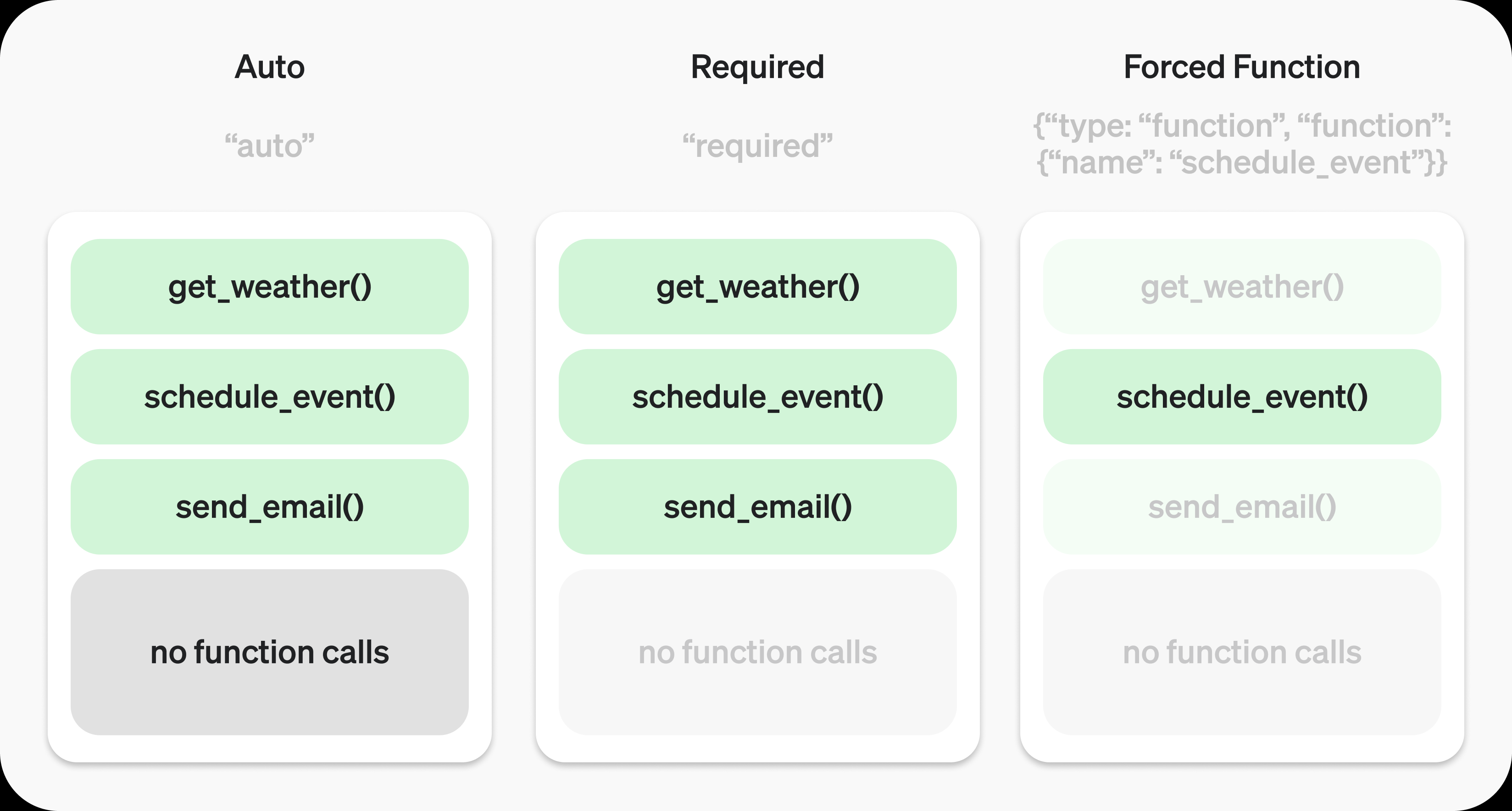
Auto模式:模型可以自由决定是否调用工具以及调用几个。
Required模式:模型必须至少调用一个工具。
Forced Function模式:模型必须且只能调用指定的那个工具。
def send_messages(messages):
    """使用requests发送消息到API"""
    try:
        global tools
        api_key = os.getenv("DEEPSEEK_API_KEY")
        headers = {
            "Authorization": f"Bearer {api_key}",
            "Content-Type": "application/json",
        }

        # 检查最后一条消息是否为用户消息
        is_user_message = messages and messages[-1]["role"] == "user"

        data = {
            "model": "deepseek-chat",
            "messages": messages,
            "tools": tools if is_user_message else [],
            "tool_choice": "auto" if is_user_message else "none",
            "temperature": 0.7,
            "max_tokens": 4096,
        }

        response = requests.post(
            "https://api.deepseek.com/v1/chat/completions", headers=headers, json=data
        )

        logger.debug(f"API调用结果: {response.json()}")

        if response.status_code != 200:
            return {
                "content": f"API调用失败: HTTP {response.status_code}, {response.text}"
            }

        result = response.json()
        return result["choices"][0]["message"]

    except Exception as e:
return {"content": f"发生错误: {str(e)}"}4.2.1.4 handle_tool_calls
不同的tool有不同的返回值结构。可以在这里的进行处理。
def handle_tool_calls(message: Message) -> Optional[List[ToolResponse]]:
    """处理工具调用的函数"""
    if not message.tool_calls:
        return None

    results: List[ToolResponse] = []
    for tool_call in message.tool_calls:
        args = json.loads(tool_call.function["arguments"])
        tool_response = ToolResponse(tool_call_id=tool_call.id, content="")

        try:
            if tool_call.function["name"] == "web_search":
                result = web_search_tool(
                    query=args["query"], search_engine=args.get("search_engine", "bing")
                )
                # 验证结果格式
                web_search_response = WebSearchResponse(**result)
                # 使用 json.dumps 处理中文编码
                tool_response.content = json.dumps(
                    web_search_response.model_dump(), ensure_ascii=False
                )
                results.append(tool_response)
            elif tool_call.function["name"] == "prepare_project_structure":
                result = prepare_project_structure_tool(
                    root_dir=args.get("root_dir", "."),
                    exclude_dirs=args.get("exclude_dirs", None),
                )
                tool_response.content = json.dumps(result, ensure_ascii=False)
                results.append(tool_response)

        except Exception as e:
            logger.info(f"执行工具 {tool_call.function['name']} 时出错: {str(e)}")
            error_response = ToolCallStatus(
                tool_call_status="error", error_message=str(e)
            )
            # 使用 json.dumps 处理中文编码
            tool_response.content = json.dumps(
                error_response.model_dump(), ensure_ascii=False
            )
            results.append(tool_response)

return results4.2.1.5 system prompt
system prompt不仅决定是否使用工具,还会影响工具使用的方式、时机和范围。通过合理配置system prompt,我们可以更精确地控制和优化模型的工具调用行为。
default_system_message = {
    "role": "system",
    "content": """你是一个智能助手,擅长解决各类问题和完成各种任务。你具备以下能力:

12. 信息获取与分析
- 当需要最新信息、专业知识或验证信息时,可以使用web_search工具
- 对搜索结果进行分析整合,提取关键信息
- 结合已有知识和搜索结果给出全面的回答

13. 项目分析与理解
- 需要了解项目结构时,可使用prepare_project_structure工具
- 基于目录结构分析项目特点和技术栈
- 提供相关建议和改进方案

工具使用原则:
14. 根据问题需求判断是否需要使用工具
15. 优先使用自身知识回答,在必要时补充工具信息
16. 可以组合多个工具以获得完整信息
17. 确保回答准确性和时效性

回答要求:
18. 答案应清晰、准确、有逻辑性
19. 适当引用信息来源
20. 必要时分点说明或使用Markdown格式增加可读性
21. 对不确定的信息要说明局限性""",
}4.2.1.6 process_conversation
流程请求的最后封装,这里要注意的就是,当本地执行完tool调用以后,要将结果封装成tool message再发给服务器。
这里有两个选择:
- 我们可以显式的构造一个请求,提供一个新的prompt,强制改变大模型后续的执行逻辑
- 我们也可以直接把tool的调用结果以tool message(参照message结构部分)去构造,让大模型完成剩下的逻辑。
def process_conversation(messages: Optional[List[Dict[str, Any]]] = None):
    """
    处理对话流程

    Args:
        messages: 可选的初始对话列表。如果不提供,将使用默认的system prompt和用户消息
    """

    conversation_messages = [default_system_message]

    # 如果提供了自定义消息,添加到system prompt之后
    if messages:
        conversation_messages.extend(messages)

    try:
        logger.info("\n开始请求对话...")
        response = send_messages(conversation_messages)
        if isinstance(response, dict):
            # 确保response包含必需的role字段
            if "role" not in response:
                if "error" in response:
                    logger.error(f"API返回错误: {response.get('error')}")
                    return
                # 如果是错误消息,设置为assistant角色
                response["role"] = "assistant"
            message = Message(**response)
        else:
            logger.error("Invalid response format")
            return

        if message.tool_calls:
            # 添加助手消息到历史
            assistant_message = Message(
                role="assistant", content=None, tool_calls=message.tool_calls
            )
            conversation_messages.append(assistant_message.model_dump())

            # 处理所有工具调用
            tool_results = handle_tool_calls(message)

            if tool_results:
                # 添加工具响应到消息历史
                for result in tool_results:
                    tool_message = Message(
                        role="tool",
                        content=result.content,
                        tool_call_id=result.tool_call_id,
                    )
                    conversation_messages.append(tool_message.model_dump())
                    summary_response = send_messages(conversation_messages)
                    if isinstance(summary_response, dict):
                        try:
                            summary_message = Message(**summary_response)
                            if summary_message.content:
                                logger.info(
                                    f"\n最终总结:\n{summary_message.content}"
                                )
                        except Exception as e:
                            logger.error(f"处理总结时出错: {str(e)}")
                    else:
                        logger.error("Invalid summary response format")


        else:
            logger.info(f"\nAssistant回复:{message.content}")
        logger.info("\n-----------对话轮次结束---------------")

    except Exception as e:
        logger.info(f"处理对话时发生错误: {str(e)}")
        import traceback

traceback.print_exc()5 总结
5.1 遇到的问题
在调用tools时,实际遇到了一些问题,例如无线调用、连续调用以及不触发的情况。目前,tool use的功能还不够完善。以下是需要注意的几个关键点:
- System Message的判断:需要对
system message进行适当的判断和处理。 - 影响调用的因素:包括
system prompt、tools的schema中的description、user prompt等,这些内容必须清晰明确。此外,请求tool_choice时的模式也需要注意。 - 利用大模型的能力:非标要的情况下,尽量依赖大模型自身的能力,而不是通过
user prompt强行改变其行为。
5.2 心得体会
system prompt和tool use schema一定要写好,几乎90%的问题都是没有描述清楚tool use里的description。总得来说:
- 功能边界:所以我们要用明确的功能和领域去隔离不同的使用场景,包括可用和不可用的场景
- 此工具用于互联网实时信息搜索。
- 此工具用于pdf文件的读写操作,其他类型文件不可使用该工具。
- 参数规范:在参数的description中应当说明参数类型和格式要求:
- location仅用于具体的地理位置。
- query长度输入不超过100个字符。
- 意图识别:对于复杂的自然语言场景,可以根据场景包含意图识别的说明:
- 当用户询问的中包含
最新信息、实时数据字眼时使用 - 用户询问模式如“最近有什么....”、“如何评价..........."句式时
- 用户询问内容包含
**等内容,禁止使用的该工具进行联网搜索。
- 当用户询问的中包含
- 优先级:复杂场景时,应当说明错误处理、优先级和关联性
- 优先使用本地数据库查询,数据不足时使用联网搜索。仍然不足时回复“数据不足以回答”
实际上,总结出这些看着很简短,但是不同场景的真实感受,还得自己不断修改system prompt、user prompt、description等多次尝试,才会找到属于自己项目的最佳实践
最后再抛出一个例子
5.3 一个例子:一句话让大模型为我调用多次方法。
比如我的prompt是:
{
    "role": "user",
    "content": "宝马X1多少钱,小米Su7多少钱,这两个车哪个更能彰显身份地位?"
}那么我会得到一个这样的response。 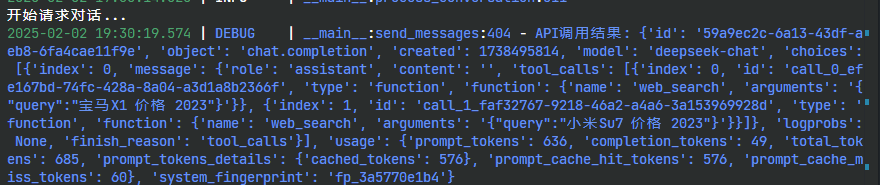 image.png
你会注意到tools_calls这个字段有两个tools调用的结果。所以,不是一个问题它就只执行一次。
"tool_calls": [
  {
	"index": 0,
	"id": "call_0_efe167bd-74fc-428a-8a04-a3d1a8b2366f",
	"type": "function",
	"function": {
	  "name": "web_search",
	  "arguments": "{\"query\":\"宝马X1 价格 2023\"}"
	}
  },
  {
	"index": 1,
	"id": "call_1_faf32767-9218-46a2-a4a6-3a153969928d",
	"type": "function",
	"function": {
	  "name": "web_search",
	  "arguments": "{\"query\":\"小米Su7 价格 2023\"}"
	}
  }
]5.4 完整代码
我把完整代码放在: https://github.com/re0phimes/BlogCode
6 参考
[1] Anthropic. Tool use (function calling) - Anthropic Documentation [EB/OL]. (2024-10)[2025-02-02]. https://docs.anthropic.com/en/docs/build-with-claude/tool-use.
[2] DeepSeek. Function Calling | DeepSeek API Documentation [EB/OL]. (2024)[2025-02-02]. https://api-docs.deepseek.com/zh-cn/guides/function_calling/.
[3] Qwen Team. Function Calling - Qwen Documentation [EB/OL]. (2024)[2025-02-02]. https://qwen.readthedocs.io/en/latest/framework/function_call.html.
[4] OpenAI. Function calling - OpenAI API Documentation [EB/OL]. (2024)[2025-02-02]. https://platform.openai.com/docs/guides/function-calling.
[5] OpenAI. API Reference - OpenAI API Documentation [EB/OL]. (2024)[2025-02-02]. https://platform.openai.com/docs/api-reference/chat/object.